Know when a competitor changes a price, on the day they change it
Point PageDiff at the pricing page, then say in plain English what you want to hear about: a plan price changing, a new tier appearing, an included limit moving. PageDiff checks the page on your schedule and sends a summary naming the figure that moved and what it moved to. It renders the page the way a browser does first, so prices that are built with JavaScript after load are read like any other text.
Pricing pages are watched badly. Someone checks a competitor's page before a board meeting, or a supplier's before a renewal, and the rest of the time nobody looks. A price that moved in March gets noticed in June. The page itself is public and changes rarely, which makes it close to the ideal thing to monitor: quiet most of the time, and worth knowing about immediately when it isn't.
What you can watch
- SaaS plan tables The standard three-or-five column pricing page. Plan prices, the monthly and yearly figures, and the included limits beside them are all ordinary text once the page has rendered.
- Usage and API pricing Per-token, per-request or per-hour rate cards. These carry the most figures and change the most often, which makes a condition naming what you care about worth writing.
- Pages that build their prices with JavaScript Plenty of pricing pages fetch their figures from an API after the page loads, so a plain HTTP fetch sees an empty table. We render the page first. On one competitor we monitor, a no-JavaScript fetch returns no prices at all and our capture holds the full five-plan table.
- New tiers and removed tiers A plan appearing or disappearing is usually more informative than a price moving, and it's the change most likely to go unannounced.
- Included limits and quotas Seat counts, request caps and storage limits. A price that holds while the included quota halves is a price rise, and it's the kind that gets no announcement at all.
- Free tier and trial terms Trial length, card requirements and what the free plan includes. These move quietly and they're often the first thing to change before a repricing.
What this won't cover
- Prices that change with the visitor's location Our checks run from a cloud network and the exit region isn't pinned, so a page that sets currency or plan prices from the visitor's IP can be captured from different countries on consecutive checks. We've observed the exit region move between checks on a page we monitor. On a localising page that can surface as a price change that didn't happen, so treat this use case as reliable for pages that price the same for everyone and unreliable for pages that don't.
- Prices behind a login, a quote form or a sales call Checks reach what's publicly reachable. Enterprise tiers listed as 'contact us' have nothing to read, and a price you only see after signing in is out of reach.
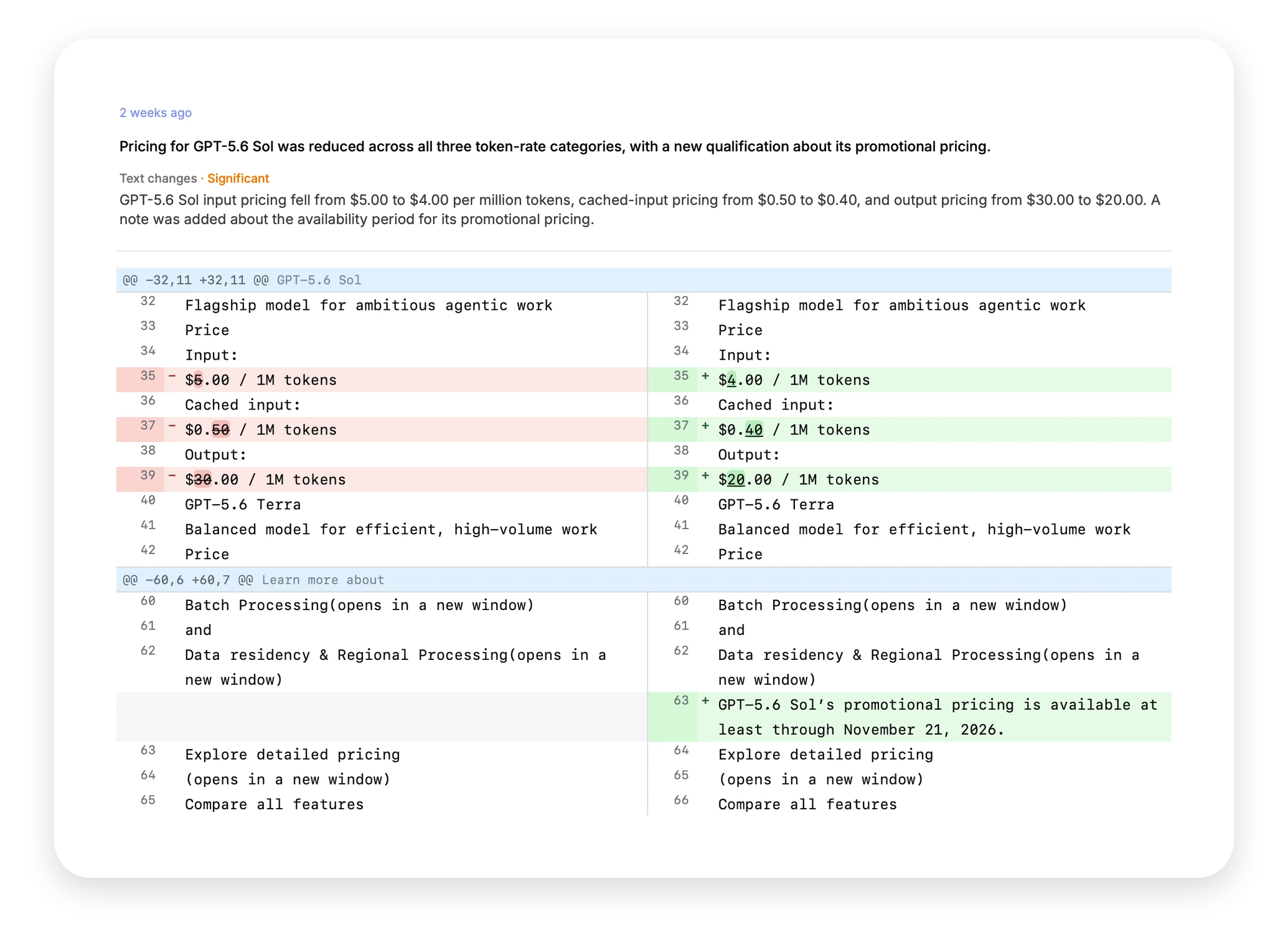
- Telling you why a price changed We can tell you a figure went from $5.00 to $4.00 and show you the page before and after. Whether it's a promotion, a repricing or a response to you is your read to make.
- Sites that refuse automated traffic Some pricing pages block datacenter traffic outright. That shows up immediately as a failed check when you first paste the URL, rather than as a monitor that quietly never fires.
- A whole catalogue across many pages A monitor is scoped to a single URL, so a competitor who prices each product on its own page needs one per page. Add-on and enterprise pricing often live somewhere separate too, and those pages move independently of the main table.
- Prices inside a PDF rate card PageDiff monitors web pages. We can watch the page linking to the PDF and tell you when the link or its date changes, but not what moved inside the file.
Scope checked against the product in September 2026. Things change. If anything here is out of date, tell us and we'll correct it.
Why this page is worth watching and hard to watch
A pricing page is public, it’s the clearest single statement a company makes about its position, and it changes without announcement. Nobody sends an email when a tier goes up 20%.
The obvious approaches both fail slowly. A calendar reminder to check quarterly finds a change up to three months after it happened. A scraping script works until the page is redesigned, and modern pricing pages are redesigned often. Many of them also build their prices in the browser after the page loads, so a script fetching the HTML gets an empty table and reports nothing, which looks exactly like a page that hasn’t changed.
Setting one up
Three fields, about a minute.
- Paste the pricing page URL. You get a live capture straight away. If the page blocks automated traffic, or if the prices don’t render, you find out now rather than after a month of silence.
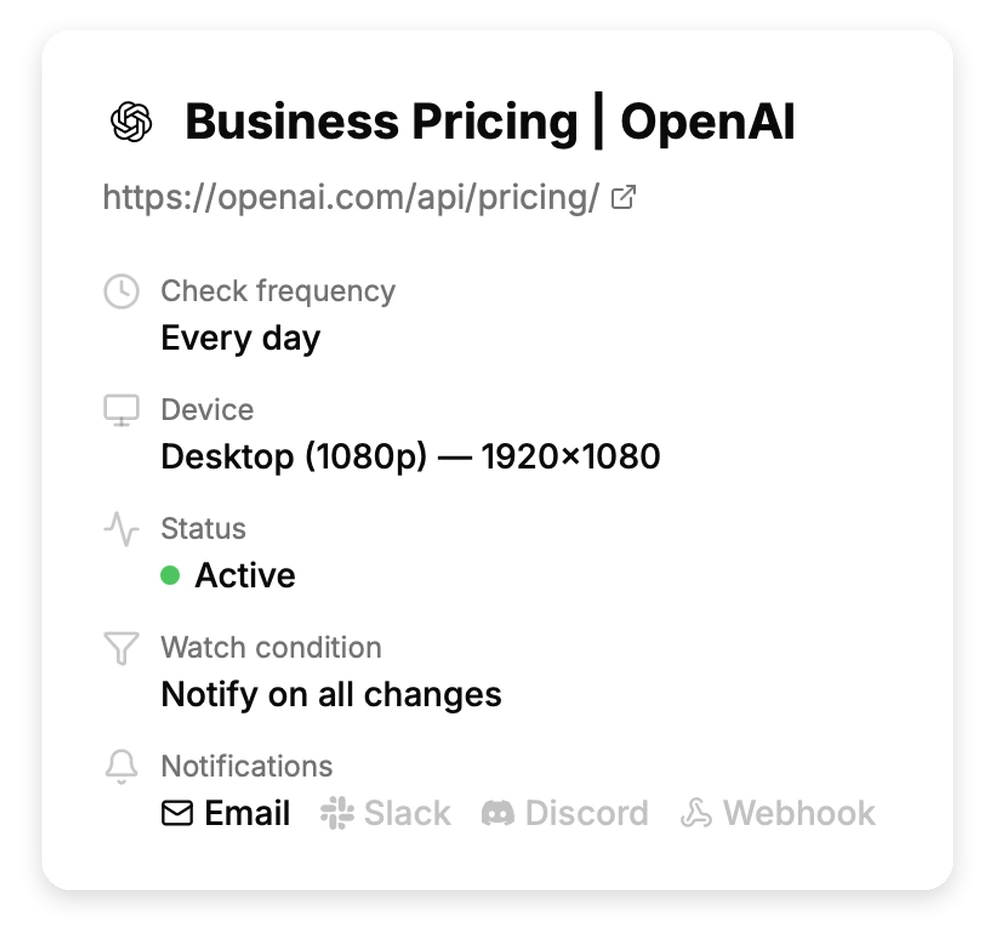
- Say what counts as a change. In plain English. “Notify me when a GPU price or its availability changes” is a real condition from a monitor we run. PageDiff reads the page and suggests conditions to start from. You can also leave it watching everything, which is how the OpenAI monitor above is set up, and let the significance score decide what reaches you.
- Choose the schedule and the channels. Daily is plenty for most pricing pages. Hourly suits fast-moving rate cards. Alerts go to email with up to five people cc’d, or to Slack, Discord, or a signed webhook.
What lands in your inbox
The figures, both sides. A summary from one of our own monitors reads that a model’s input rate went from $5.00 to $4.00 per 1M tokens, cached input from $0.50 to $0.40, and output from $30.00 to $20.00. That’s a sentence you can paste into a channel without opening anything.
Underneath it are the text and visual diffs and a stored snapshot of both versions, which is what lets you show what a competitor charged on a given date rather than relying on someone’s memory of it.
Two things decide whether a change reaches you, and they run in that order:
Page changed → does it match your watch condition? → is it significant enough? → alert.
With a condition set, a change has to clear both. With no condition, the significance score decides on its own. The OpenAI monitor above runs the second way, which is why a rate cut reached us without anyone having written a condition for it.
Pricing pages carry a lot of furniture: rotating banners, promotional strips, cookie notices, footers. On one GPU pricing page we watch, the company swapped its header promotion and changed its office address in the footer on the same day. The change was scored low, it didn’t match a condition about prices, and nothing was sent.
What three weeks of running this looked like
We validated this use case on three real pricing pages before writing the page, and kept the log.
An API pricing page. Caught a model’s rates being cut, with all three figures named to the cent, on a page that builds its content with JavaScript. This monitor runs with no watch condition at all, so the score alone decided that the change was worth sending. Also caught the page being rebuilt from one product’s pricing into another’s, and an interactive pricing calculator being removed from an FAQ section.
A GPU cloud rate card. Caught two new configurations being listed at $1.09/hr and $0.59/hr. Over the same nineteen days, no existing GPU’s price moved, which is worth saying plainly: this page proves we catch a new option appearing at a stated price, and it didn’t get the chance to prove we catch $2.89 becoming $2.69.
A competitor’s home page with the plan table on it. Reported nothing for nineteen days, because the company didn’t change its prices. The capture held all five plans with both billing periods throughout, on a page where fetching the HTML without JavaScript returns no prices at all.
Who gets the alert
A price change lands on different desks depending on who you are, and it’s worth deciding that before you set the monitor up rather than forwarding it around afterwards.
Product and founders. A competitor collapsing five tiers into three, or moving a feature up a plan, is a repositioning. The figure matters less than the shape of the change.
Sales. Any price you quote in a deal or a battlecard. Being corrected by a prospect on a competitor’s current pricing is a bad way to find out it moved.
Finance and procurement. Suppliers you renew with, watched ahead of the renewal rather than during it. This is the case where a quiet monitor pays for itself once.
Alerts go to email with up to five people cc’d, or to Slack, Discord, or a signed webhook, so the change can reach the desk that acts on it without a forwarding step.
Which pages are worth a monitor
- Your two or three closest competitors’ pricing pages. The ones you’d want to know about the same day.
- Suppliers you renew with, watched ahead of the renewal rather than during it.
- The pricing page of anything you resell or build on, where their change becomes your margin.
- Free tier and trial terms, which move before headline prices do.
On plans: Starter at $10/month gives you 10 monitors and hourly checks, which covers a competitive set and the suppliers behind it. Daily checks are enough for most pricing pages, so the reason to move to Pro at $30 is usually the count rather than the frequency. Every plan is fully featured; they differ only by scale.
Try it on the page you have in mind
Paste a public URL to see the live capture and the watch conditions PageDiff suggests. No signup needed.